box slider
 fullwidth slider
Encountered Error Messages and Solutions
- Home
- IT Consulting
- Solution
- Encountered Error Messages and Solutions
I encounter many errors with devices; some of which have no solutions posted online. I’m publishing them here hoping to help others desperately searching for answers.
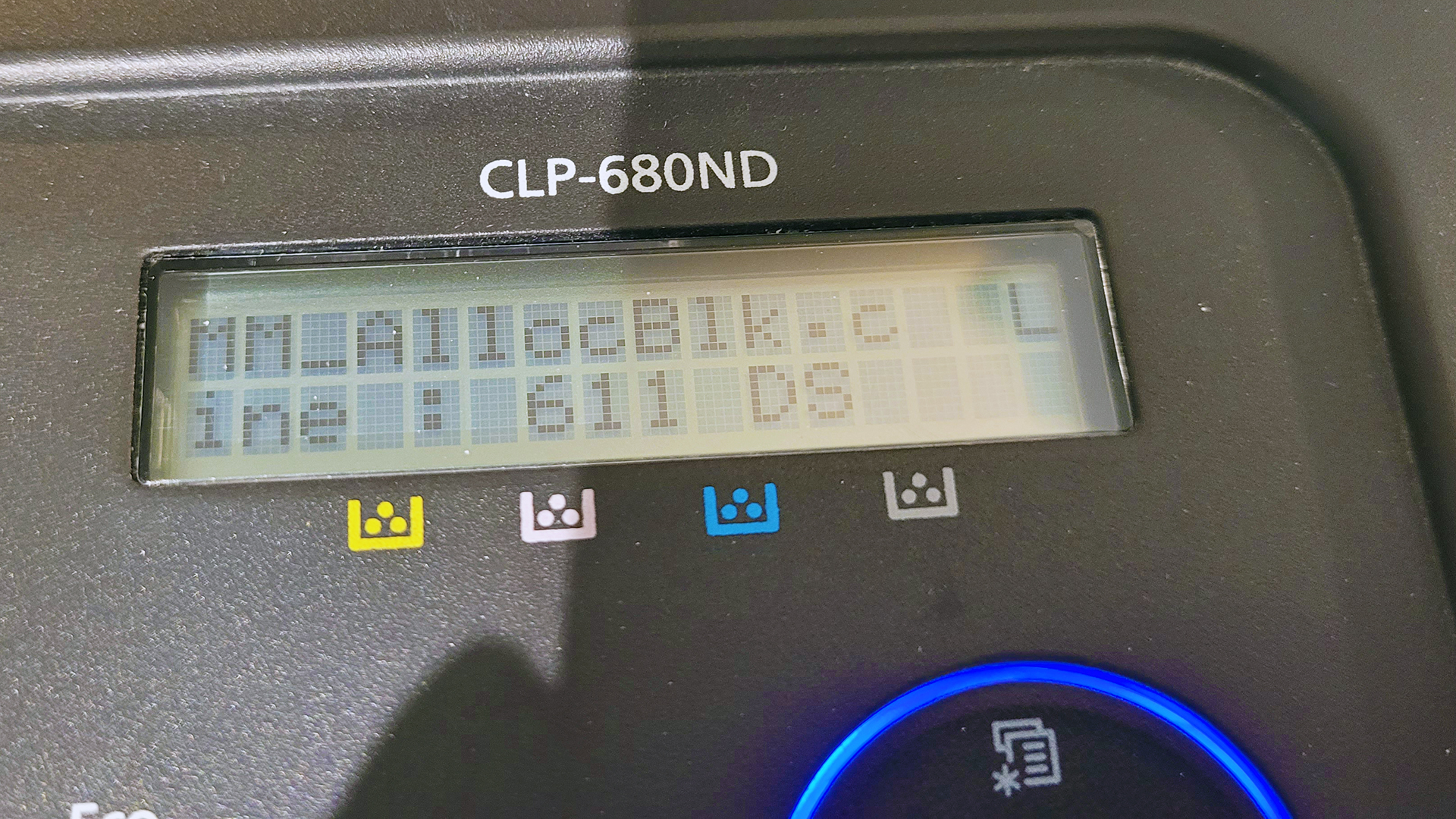
| Device | Samsung CLP-680ND Laser Printer |
| Error Message (s) | MM_FreeBlk.c Line : 501 PJL Internal Error Power Off/On MM_AllocBlk.c : Line 611 DS |
| Encounter | Attempted to print through USB Cable connection after installing driver from HP on Windows 11 Pro 25H2. Tried a different USB cable and computer and the error remained. |
| Solution | Switched to Network/LAN connection and assigned Static IP to printer. Default user / password to admin was: admin / sec00000 |
| Device | HP ProDesk 600 G2 DM TPC-P055-DM W3V99UP#ABA |
| Error Message (s) | Unable to boot from USB Drive – Not found |
| Encounter | Attempted to boot off several USB Drives including NVMe drive inside enclosure and also regular USB Flash Drives. Disabled and Enabled Secured Boot – reset BIOS to defaults – Boot Menu would not detect any other drive aside from the Internal SATA drive as can be seen in this Boot Menu picture. USB drives were plugged in to all ports, front and back and also the single USB-C port included with this PC. |
| Solution | Uses a 16 GB Flash drive. For some reason these PCs are limited to only detecting drives no bigger than 16 GB. Once a Flash drive was prepared with only 16 GB capacity, the Boot Menu changed and detected the flash drive as seen here. |
| Device | HP Pavilion All-in-One – 27-r114 3LA05AA |
| Error Message (s) | The BIOS you are installing is older than the current version in the system and cannot be executed. |
| Encounter | I visited the product download page for this HP PC and downloaded the latest BIOS update package. I received the above error after executing it, so I tried the 2nd to last update and that one worked. |
| Solution | See this article here |
| Device | Windows 11 Workstation Citrix Workspace App |
| Error Message (s) | An unknown error occurred while trying to open the resource. Transaction Id: 3e3038db-c527-450f-bc4c-515241290644 |
| Encounter | While trying to open a remote application within the Citrix Workspace App the error immediately appears. Even if you reinstall Citrix or use the cleanup utility, the problem may remain. |
| Solution | See this article here |